Every task on your data, start to finish, without leaving Datasiq.
One place for everything you do with data. Today you connect, check and ask about your data here, and approve fixes to spreadsheets. The rest of the work is coming, step by step.
Finding out the numbers were wrong after the report went out?
A total is off, a customer is counted twice, a field is blank, and nobody sees it until a decision has been made on it. Datasiq catches it first, so the report you send is one you can stand behind.
That is the real cost: not the mistake, but everything decided on it. The stock ordered, the price set, the report already sent.
Before
Your data lives in places that never talk.
- Spreadsheets
- Warehouse
- CRM (early version)
- Dashboards






After
Checked together, in Datasiq.
Your spreadsheets, warehouse and CRM (early version) are checked together, you get one Dashboard and answers across them from Nyksen, and the summary comes to your email.
For small teams
You run a few stores or an online shop. You pull sales from Square, Shopify or Stripe, paste them into a spreadsheet, and spend hours cleaning it by hand. You are still not sure the totals match your books, and there is no data person to ask.
For larger teams
Forty outlets, each with its own till, plus card payouts and the books. At month end the numbers do not agree, and your team loses days working out which store is off. Checking by hand does not keep up.
The four things Datasiq looks for
Duplicates
The same order or customer counted more than once.
Gaps
Fields left empty, so totals come out short.
Mixed formats
Dates, emails and phone numbers written three different ways.
Odd values
A negative price, a date in the future, a number far from normal.
Made for the businesses where totals disagree most
Datasiq works with any data. We start where tills, orders, payments and books most often tell different stories.

Restaurant and food chains
Restaurant groups, quick service and cafe chains, from 10 to 200 outlets.
ToastPetpoojaTallySquare, QuickBooks and Xero are early-version connections.
Today: Find duplicate orders, missing totals and odd prices in till and order data, and ask Nyksen which outlet sold what.
Live now: Which outlets’ till sales never reached the books, per outlet and per day.
Multi-store retail
Retail brands with a handful of stores or a few hundred.
LightspeedCloverSquare and NetSuite are early-version connections.
Today: Catch products listed twice, blank prices and odd values in sales, product and stock data.
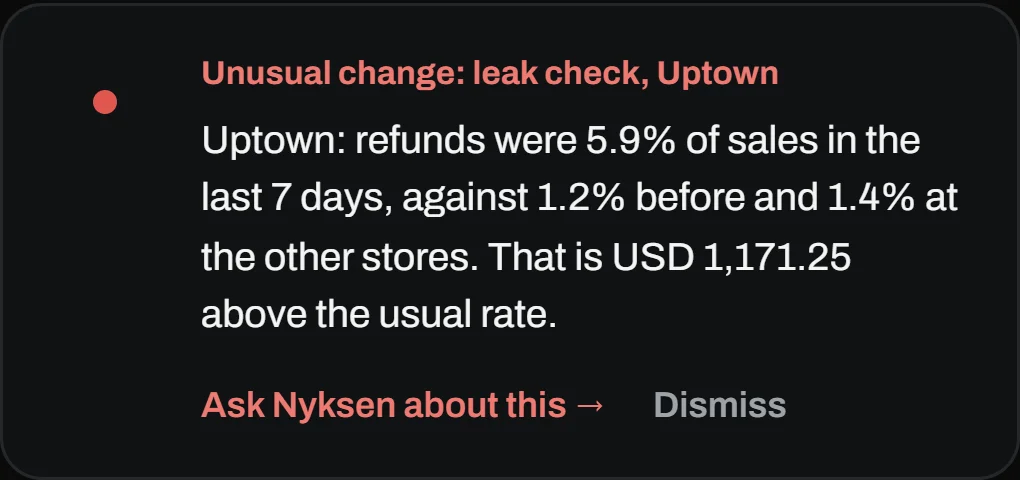
Live now: Which stores’ card sales never arrived as a payout, and which store’s refunds jumped.

Ecommerce brands
Online and omnichannel brands selling through their own store and marketplaces.
Google Analytics is an early-version connection.
Today: Check orders, payments and customers for repeats and gaps, and ask Nyksen where sales dropped.
Live now: Which orders were paid but never shipped, or refunded twice.







Photos: Nathan Dumlao, Keren Roeglin, Bench Accounting, Vitaly Gariev, Unsplash.
Know which store is off, and by how much
Datasiq lines up each store’s till, its books and its card payouts, and tells you which one needs a look. It points at the numbers, never at a person.
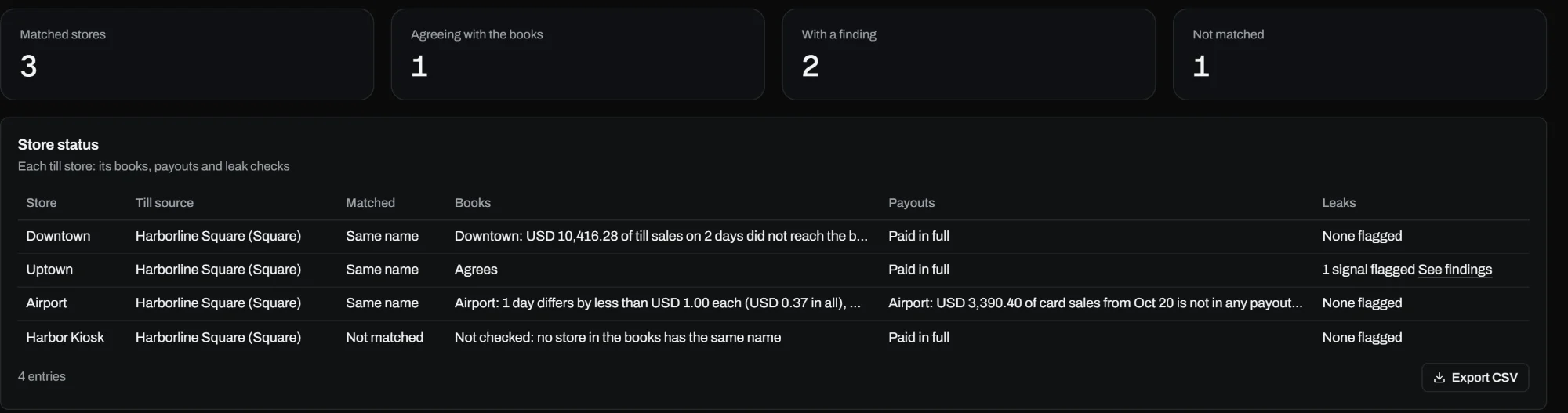
Example data from a demo restaurant group. The Stores page: every store matched across the till and the books, with its payouts and leak checks.
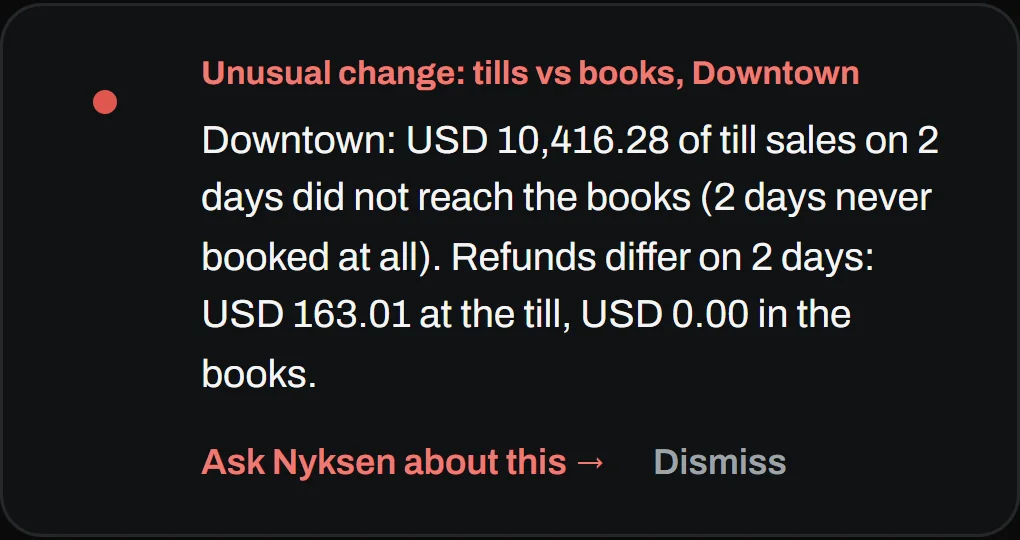
Tills against books
Per store, per day, down to the cent, with refunds counted on both sides.
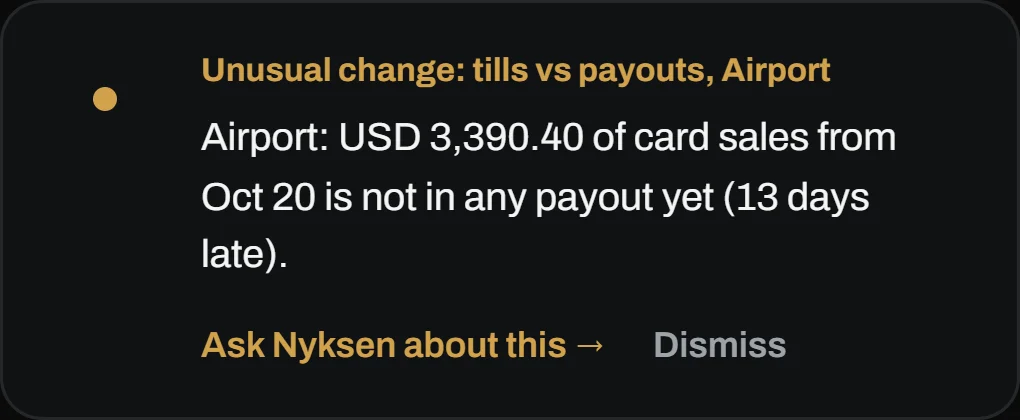
Tills against payouts
Card sales that were rung up but never arrived as a Square or Stripe payout.

Leak check
A store whose refunds, voids or discounts jump well above its own history and the other stores. The same item priced differently across Square locations.
Online orders
Orders paid but not shipped, refunded twice, cancelled but still charged, totals that do not add up, and disputed charges.
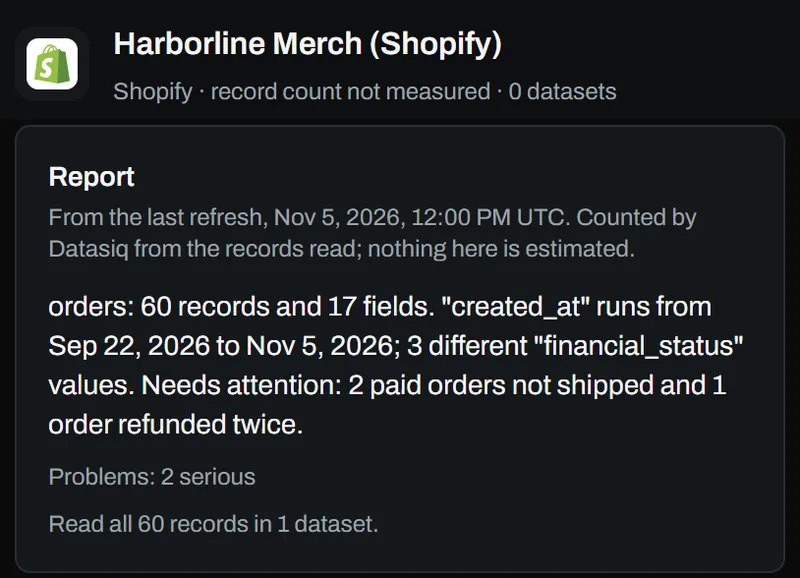
Example findingOne order was paid and never shipped. Another was refunded twice.
A Stores page
Every store matched across the till and the accounting system, with its books, payouts and leak status in one row. You can match or unlink a store yourself.
Example findingDT-01 in the till is Downtown in the books. Match them once.
An email to the owner
A short note on the stores that need a look, so you do not have to open anything to know.
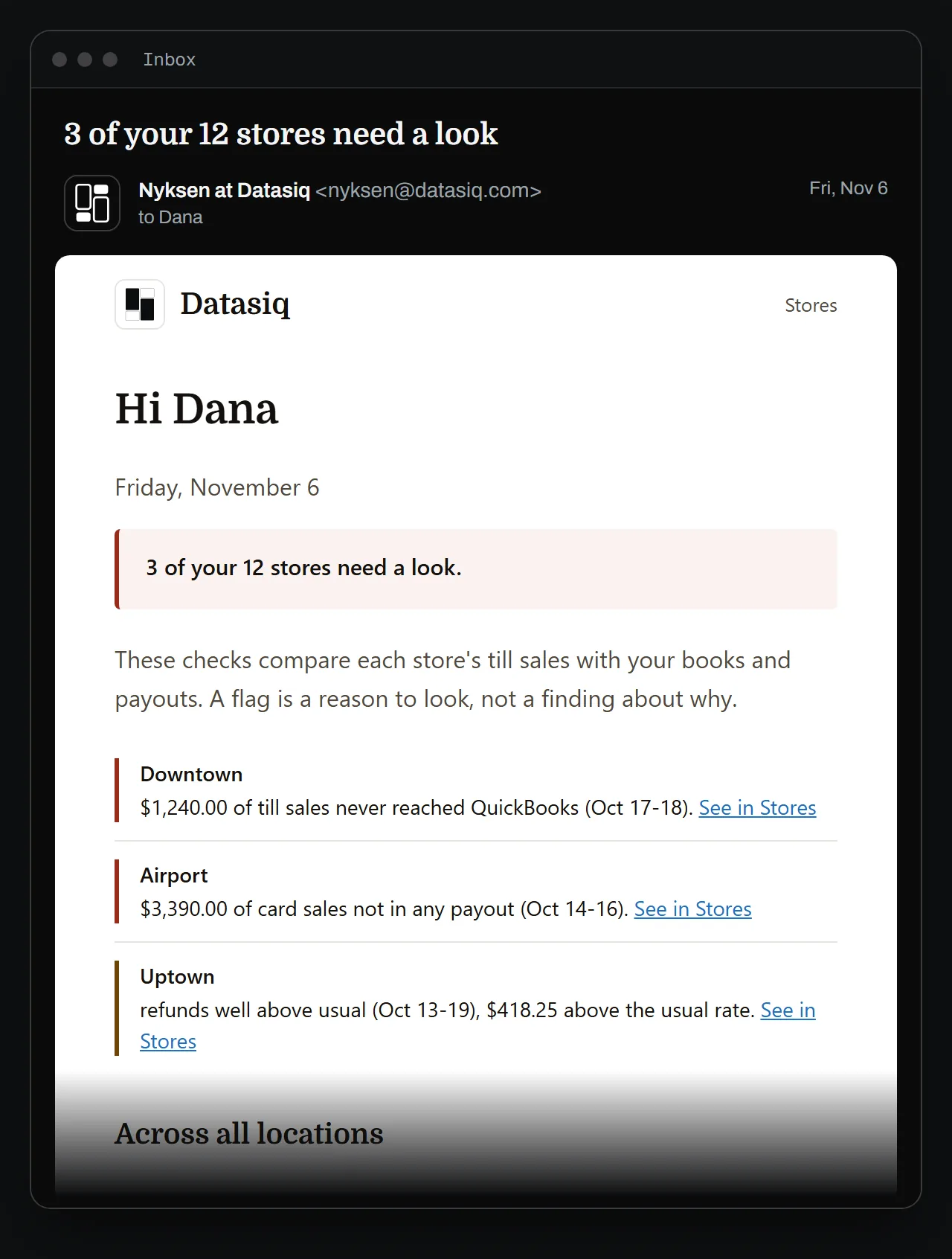
Example finding3 of your 12 stores need a look.
New to it? “Set up your stores” walks you through the first run: connect your tills, connect your books, and check that your stores are matched.
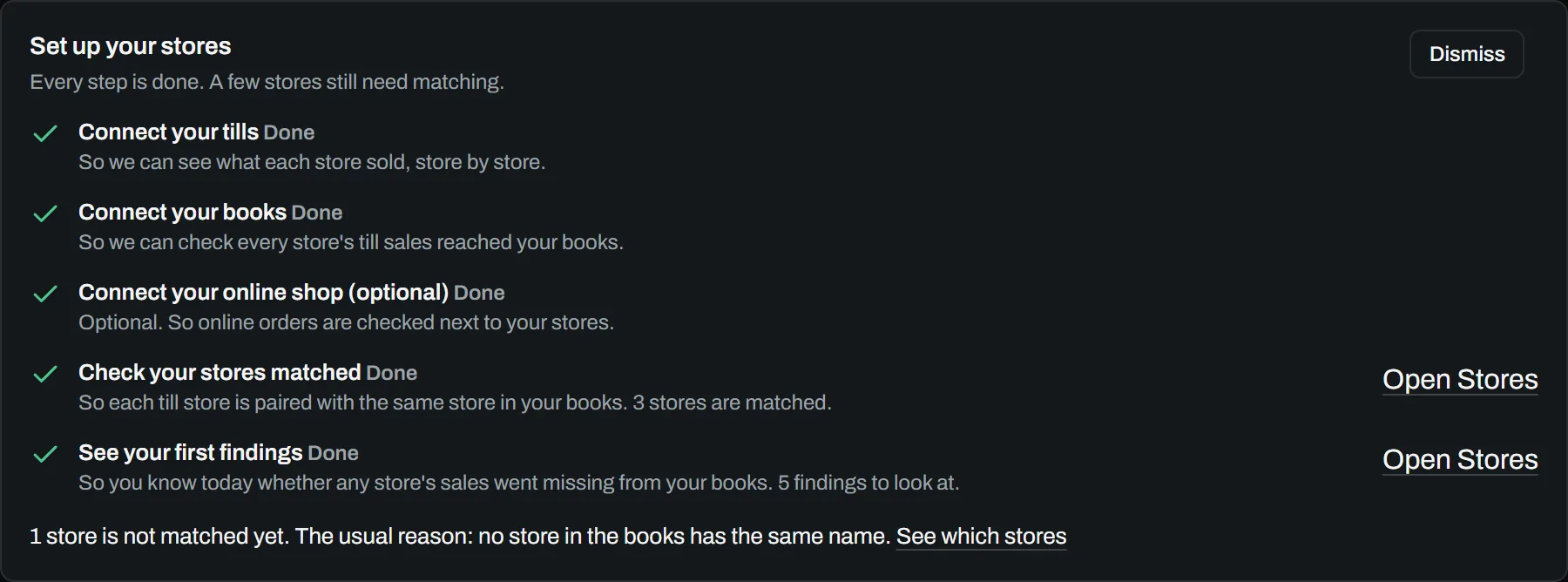
Screenshots show example data from a demo restaurant group, not a customer; the sample email is made-up too. The other example findings are wording only. Square, QuickBooks and Xero are early-version connections. Cafe photo: Vitaly Gariev, Unsplash.
Spending hours checking spreadsheets by hand?
Connect what you already use and Datasiq does the checking, explains what it found, and answers your questions. Four steps, all in your browser.
Sign in to Google Sheets, upload a file, add an app like Stripe or Shopify, or enter a database login. There is nothing to install.
Each source gets a score, a short report on what Datasiq found and what it could not check, and the three things to fix first at the top. It checks again on a schedule, so you hear about a problem before your customers do.
Nyksen is the assistant built into Datasiq. Ask in your own words, across several sources at once, and get an answer with a chart when it helps. Turn any answer into a PDF or a slide deck.
Nyksen drafts the fix and shows exactly what would change, and nothing is applied until an owner or admin approves it. Today for spreadsheets in Google Drive, OneDrive and Dropbox (early version). Databases (Soon).
What else you get
- Each finding has an "Ask Nyksen about this" button, so the explanation comes with your data in view.
- Set a target on a key figure and Datasiq checks it every hour.
- See how your data connects: which datasets feed which, built from your database.
- For Snowflake, see what a check will cost you before it runs.
- The likely cause of a problem, and everything it affected (Soon).
Who connects to your data?
Only the Datasiq engine. It connects to your tills, books, stores, warehouses and files, and everything else works through it, Nyksen included.
- Google Sheets
- Excel
- CSV
- Shopify
- Stripe
- Slack
- PostgreSQL
- MySQL
- SQL Server
- Snowflake
- BigQuery
- MongoDB
- Square (early version)
- QuickBooks (early version)
- Xero (early version)
- NetSuite (early version)
- Google Drive (early version)
- Salesforce (early version)
- HubSpot (early version)
- Dropbox (early version)





Your data stays private
Nyksen never connects to your systems.
The Datasiq engine makes every connection. Nyksen, our assistant, holds none of your logins and sees only what the engine hands it.
It sees what a question needs.
For your databases and apps, that is mostly names, counts, scores and findings, with a few example values where card numbers are hidden and emails and phone numbers are masked. For a file you upload, it also reads rows from that file.
Rows from your databases are not kept.
The engine reads a sample to run its checks, then lets it go. It keeps the results and a few example values per column.
Your login details are stored encrypted.
We recommend giving Datasiq a login that can only read.
Not used to train Claude.
Nyksen runs on Claude, and under Anthropic’s commercial terms what it is sent is not used to train its models.
Every detail is in our Privacy Policy.
Worried a tool will change your data?
Datasiq proposes and you decide. Here is who can do what, and what goes on the record.
You set the pace.
Every action starts switched to manual. You decide how far Datasiq may go on its own, one action at a time.
Every change is on the record.
Each approved fix is recorded in an audit trail, so you can always see what changed and when.
The right access for each person.
Owner, admin, analyst or viewer, with two-step sign-in.
Your data stays yours.
Your data is never sold, and each organisation’s data is kept apart from every other.
Read exactly what we keep in our Privacy Policy.
Will it work with what you already use?
Tills, online stores, payments, accounts, spreadsheets and databases. Every name below works today unless it says otherwise.
Spreadsheets and files
- Google Sheets
- Excel file
- CSV file
- JSON file
- XML file


Apps
- Stripe
- Shopify
- Slack
- Tally
- Petpooja
Databases
- PostgreSQL
- MySQL
- SQL Server
- Snowflake
- BigQuery
- MongoDB
ERP and HR
- SAPS/4HANA, SuccessFactors
- MicrosoftDynamics 365, Business Central


Cloud storage and warehouses
- Amazon S3
- Amazon Redshift
- Amazon Athena
- Google CloudCloud Storage
- Microsoft AzureBlob Storage




Any app with an API
- REST
- GraphQL
Files and work apps (early version)
- Google DriveEarly version
- OneDriveEarly version
- DropboxEarly version
- AirtableEarly version
- NotionEarly version
- JiraEarly version
- GitHubEarly version
- DatabricksEarly version






CRM and marketing (early version)
- SalesforceEarly version
- HubSpotEarly version
- ZohoCRMEarly version
- PipedriveEarly version
- FreshsalesEarly version
- Google AnalyticsEarly version

Store sales and payments (early version)
- SquareEarly version
- ToastEarly version
- CloverEarly version
- LightspeedEarly version
Accounting and ERP (early version)
- QuickBooksEarly version
- XeroEarly version
- OracleNetSuiteEarly version
Soon
- OracleSoon
AI model
- ClaudeAnthropic
- ChatGPTOpenAIComing soon
- GeminiGoogleComing soon
- GrokxAIComing soon
- KimiMoonshot AIComing soon





Nyksen runs on Claude by Anthropic. Your data is never used to train it. The other models are coming soon.
Choose your cloud and region (Soon)
- AWSSoon
- Microsoft AzureSoon
- Google CloudSoon

A dedicated Datasiq environment on the cloud and in the region you choose is planned, not live. Today Datasiq runs as one shared service, with each organisation’s data kept apart.
What does it cost?
Try any plan for 14 days. No card needed, and 50 AI messages are included.
Plans
Nyksen included in every plan
- ProUSD 9 /month
1 team member · 50 AI messages a month
For one person with one source.
- TeamUSD 29 /month
3 team members · 200 AI messages a month
For a small team with a few sources.
- BusinessUSD 49 /month
10 team members · 500 AI messages a month
For a growing team that shares its data.
- UltraUSD 99 /month
25 team members · 1,500 AI messages a month
For a company with many sources and people.
Choose your plan in the app.
Start the 14-day trial, then pick a plan under Plan & usage
Per month, excluding tax.
Up to 1 / 3 / 10 / 25 data sources by plan; the trial includes 3.
Custom
For larger companies.
We set Datasiq up with you, connect your sources, and agree the volumes, people and terms you need. A one-time setup fee applies.
Dedicated cloud is not available yet. Ask us what is available today.
Ask usmarketing@datasiq.com
Questions people ask
Where the database supports it (PostgreSQL first), no: the checks run inside it and only the results come back. Datasiq does keep a short preview of each source so you can see it, plus any files you upload. The Privacy Policy lists exactly what is kept and for how long.
No. A fix stays a proposal until an owner or admin approves it. See how a fix works.
For a spreadsheet, Datasiq keeps the previous version before it writes anything, and undo puts it back. If someone edited the file after the fix, undo stops rather than overwrite their change, and the earlier versions stay in the file’s own version history. See how a fix works.
Spreadsheets and files, business apps, and the common databases, each shown with its status. See everything it works with.
No. You connect a source by signing in or entering a login, and Datasiq tells you what it found in plain words. If you have a question, ask Nyksen the way you would ask a colleague.
You can use Datasiq on your own or with your team, for any work with data. Right now our focus is retail and restaurant chains: we compare each store’s tills with its books and its card payouts. See what it checks for a chain.
For each store and each day, we compare the till with the books and with the card payouts, down to the cent, and flag a store whose refunds, voids or discounts jump well above its own history and the other stores. For an online shop, we look for orders that were paid but not shipped, refunded twice, cancelled but still charged, or disputed. Square, QuickBooks and Xero are early-version connections. See the checks.
Yes. Larger teams get roles, approvals and an audit trail today. For single sign-on, your own region or a dedicated environment, write to us and we will tell you where each one stands. marketing@datasiq.com
Ready to trust your numbers?
Connect one source and see what Datasiq finds first.